Craftznake
Why Terminal Emulator Engine?
May 9, 2026
This is my short note from building Kai (Kommand Line Artificial Intelligence). It is not a complete guide on terminal emulators - it is just the things I learned while trying to make an AI agent understand what is actually happening on my terminal.
This stuff broke my brain a little bit 🤯.
The vision behind Kai was simple, perhaps almost naive: I work with terminal a lot, and maybe 90% of the time, with the development of AI recently, it would be great if I could keep the normal, predictable terminal behavior we all rely on, but inject an AI agent that actually understood the full context of what I was doing. In other words, I wanted the agent to live in my natural habitat, looking over my shoulder, offering context-aware suggestions based on exactly what was happening on my screen.
First implementation
My first implementation was built on a naive understanding 😅. That is, run each command in isolation, grab the output, and hand it over to the agent. And at the end of the day, the agent would have my interaction, including input and shell output.
// Naive approach: one process per command.func RunCommand(cmd string) (string, error) {c := exec.Command("zsh", "-lc", cmd)out, err := c.CombinedOutput()return string(out), err}output, _ = RunCommand("command1")output, _ = RunCommand("command2")
Under the hood, as I could not maintain the long-lived shell while being able to capture the input/output of the user (basically, because the shell didn't give me options to do so), so I need to wrap it under the standalone execution, which we could control the boundary and the state of it, and inside Kai, by limiting only 1 command to be executed in the 1 execution, theoretically, we could capture the input/output shape of each command.
Huh, is that enough?
The short answer is no. And it's originated from the original difficulty that we mentioend ealier.
It's because of the way terminal, shell and operation system are interacting currently, which is cover in the next section.
TLDR: our current working shell is a process that long-lives in the whole session, and sits between terminal and the operating system's core kernel.And by long-live, it means, all the commands we submit into the shell are handled by 1 single process, which is the stateful process, that has the understanding about the current session.By stateful, it means, the shell holds the current state of things like, variables, shell process context (current working directory, process IDs, file descriptors pointing to the terminal screen and keyboard), execution history, job controls.
So, this idea failed from the beginning.
Before going into the newer approach, I think it's also useful to visit the historical point of the terminal/shell, to give everyone the same understanding about the things that we do in the new approach, which heavily depends on this.
What is terminal
Nowadays, we have the application on our laptops, called "terminal," but that word is a historical fossil.
Before:
In the 1970s, a terminal was a physical piece of hardware - a clunky, mechanical Teletype machine (like the DEC VT100) sitting on a desk. It performed zero local computing. It simply transmitted raw keystrokes down a physical serial cable to a massive mainframe computer, which in turn streamed back a sequence of bytes to be printed on paper or rendered on a "screen".
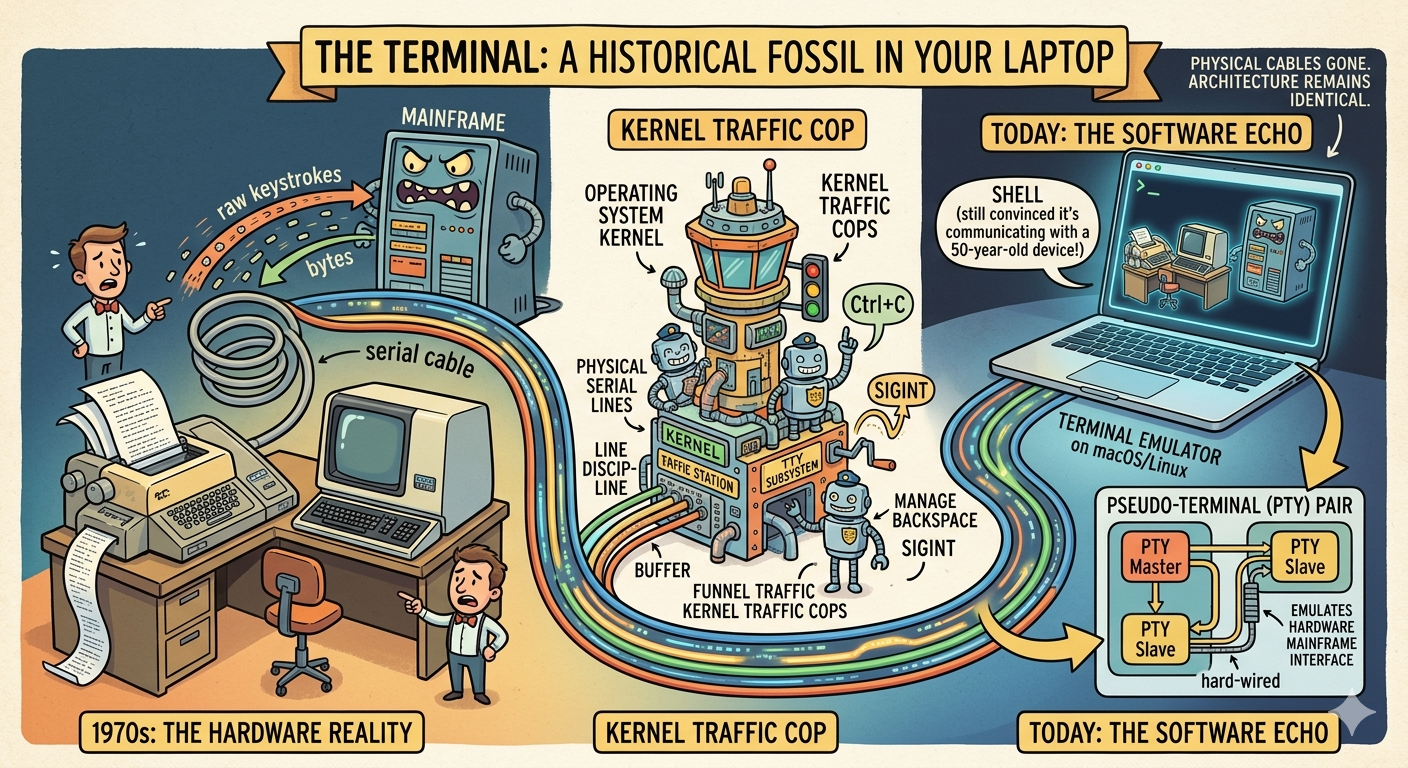
Because compute was expensive at that time, and multi-tenancy was non-trivial, the operating system kernel had to act as the direct traffic cop (multiplexer) between these dumb endpoints (terminal/tty) and running execution streams (actual programs running inside the central computer).
Because the terminal on the desk was "dumb," it knows nothing about what is processing.
For example, If someone typed APPLD and realized they misspelled it, they would hit the backspace key to type E. What should be the input from the terminal sent to the compute there, APPLE? No.
The dumb terminal sent those raw characters straight to the running program, the program would receive A -> P -> P -> L -> D -> Backspace -> E.
Meaning, the program itself would have to figure out that they meant APPLE.
And this logic is fragile that we have to maintain this separately on different program, which wasted effort.
This gave rise to the TTY subsystem in Unix - a stateful layer of software inside the kernel designed explicitly to manage physical serial lines, enforce line discipline (like managing the buffer when we hit backspace), and handle asynchronous signal delivery (like translating a Ctrl+C into a SIGINT), so application, by default, get get this out of the box benefit.
Current:
Today, the physical cables and hardware terminals are gone, but this kernel architecture remains fundamentally identical.
The terminal we see on our computers is actually a software emulator of that physical hardware. Under the hood, when we open a terminal app, the OS allocates a pseudo-terminal (PTY) pair. The PTY master acts as the bidirectional software interface for the emulator itself, while the PTY slave emulates the hardware mainframe interface. The execution layer—our shell—is entirely convinced it is communicating with a physical hardware device via a stateful serial line, just like the original terminal-mainframe interaction.
Within the terminal, we usually use an interactive shell (such as Bash or Zsh) to manage system resources. The interaction chain flows as follows:
Rendering diagram...
Through this interaction chain, historical functionality—such as line discipline - must still be supported just as it was between the terminal and mainframe, because decades of applications and tools are built around it.
It is also worth pointing out that because the terminal emulator and its shell are running processes, the PTY pair remains active throughout the session. We continuously interact with that same single shell process, which is why everything we do inside a session persists. In addition to handling kernel and terminal interactions, the shell manages other essential features such as environment variables, execution history, and shell context (current working directory, process IDs, file descriptors, etc.).
In short, the shell is the true stateful process. It sits in the middle, computing and maintaining session state based on the input stream it receives throughout our interactive session.
We have this simple example to describe the above statement.
Open 1 new shell process (you could use your terminal emulator ofcourse), and run this command:
export SESSION_TOKEN="xyz123"
Now, open a new shell process in an new terminal, don't start the new shell inside the current shell, and run this command:
echo $SESSION_TOKEN
What would be the output there, is it empty?
The expected output is empty, as long as you don't set any SESSION_TOKEN variable as the shell variable
The reason behind this, is that, as said, shell is a stateful process, and when we run export SESSION_TOKEN="xyz123", the shell simply, execute the built-in function export, and bring the above key value into its state, which in turn is apparently not persist across state.
Now comeback to the first implemenation, we could visiualize the first implementation of KAI in the shell context, is exactly like this:
(command1) # NOTE: (command) mean we execute the command inside sub process, which doesn't known the parent process, nor share the same context with parent process(command2)
And easily, we could point out that the first implemenation will be for sure wrong in this case. You could run this in your shell
unset SESSION_TOKEN(export SESSION_TOKEN="xyz123")(echo $SESSION_TOKEN)
Second implementation
With that historical context in mind, we can now be more precise about why the first implementation fails: when we wrap our command inside the single execution like that, it's not that we interact with the same shell, it's that we spawn different processes with different context and push our commands as stdin of the process, read the whole stdout and terminate the process, so every command that run here doesn't share the same shell state, which in turn makes them lose awareness and information about other sibling commands.
So, as instinct, I feel that, the proper way of doing this, is to get rid of the standalone execution, and do something that works natively with the long-running shell. How about making KAI persist the same shell session for all the commands, so they could have the same state then?
My first hack to this, is that, by using a reserved special prompt to mark the start of the command, then by design, we could easily track, the latest command by looking up the 2 nearest prompt characters there. Which is well demonstrated by this snippet.
// Fragile shortcut: delimiter-based parsing.func StartSession(shell string) (*Session, error) {sh := exec.Command(shell, "-i")sh.Env["PROMPT"] = "$KAI: "// ...}
This works in some cases like
$KAI: User-input-is-here -|Command output line 1 | This is the input/output pairCommand output line 2 |Command output line 3 |$KAI: -|
This is error-prone for many reasons:
- User prompt is usually customized before, and by overriding this, we give the user fewer options to customize their prompt, which reduces the experience.
- This fails if the user opens alternative screen with a tool like vim or htop that manipulates the entire screen buffer.
- If any segment inside the output includes our reserved prompt (it's rare, but that doesn't mean it never happens), then it will wrongly capture the output.
- And, the final stream output is not always beautiful like that, by reading the raw stream output, a lot of invisible characters wander inside the text, and some special characters that should be seen by agents, as it brings no benefits but confusion.
To fully understand the last reason, it's reasonable to put the control sequence into this place, to give the context why this is a painful way.
Xterm Control sequences
As we could see, by design, the terminal works with the shell seamlessly, and we could easily see that 1 terminal could work with multiple shells. How could this be possible without tying terminal and shell into 1 place?
1 other option is to make them fully understand each other, or, in other words, to make terminal and shell behind it talk the same language. Here is where the protocol gets into the play. The most well-known, and at the time of writing this, the only protocol that I know, is xterm control sequences. This designs a set of commands and their functionality that the communication should deliver, and all the clients that use it need to know it - which is a clue for terminal and shell to share the same understanding about the state and behave accordingly.
And by design, it is more like the protocol to parse the byte sequence into sequences of understandable commands, and each part in the system decides to behave accordingly due to that. This is well documented under this page, which is also the source of truth for xterm-compatible implementations.
And to easily understand why this matters, we could go through this set of examples.
Imagine this flow, the user presses APPLD, then realized they misspelled it, and presses backspace then E, what we see on the screen is APPLE, but is that the real thing that KAI saw.
If we inspect the byte data that is being produced on the way under the hood, it will be:
Literal(A) -> 0x41Literal(P) -> 0x50Literal(P) -> 0x50Literal(L) -> 0x4CLiteral(D) -> 0x44Backspace -> 0x7F or 0x08 (depending on whether DEL or BS is used by terminal)Literal(E) -> 0x45
Assume that we will have this byte sequence that is produced by the terminal, (we might want to ignore other unrelated sequences for the purpose of demo)
0x41 0x50 0x50 0x4C 0x44 0x08 0x45
This data will flow through the shell, the TTY driver echoes the stream outbound as this:
0x41 0x50 0x50 0x4C 0x44 0x08 0x20 0x08 0x45
So by design, why do we have 0x20 and 0x08 there, the operation to produce the Backspace (from single 0x08 sequence) into 3 subsequent sequences (0x08, 0x20, 0x08) is the design of the tty echo. Specifically, the tty echo does these 3 operations for a reason:
- 0x08 (\b - backspace): moves the cursor left by 1 column (cursor sits on top of D)
- 0x20 (space): override content of current cell with space char, cursor moves right by 1
- 0x08 (\b - backspace): moves cursor left 1 column again, now we are in the place ready for next E
What I mean by that is it's not necessarily that the terminal writes the wrong sequence, it's more about, they all share the same understanding about how to produce and the data format, and whenever the data goes through it, each component will react accordingly to the byte stream, it could potentially modify its states, compute new states and emits data to the layer behind that using those new states, which could potentially introduce new sequences into the data flow through it. And, as long as the components inside the system understand what each other says, it's still fine.
You could test by running these two commands in your terminal, it will produce the same output:
echo "4150504C440845" | xxd -r -pecho "4150504C4408200845" | xxd -r -p
Let me give another example of these sequences:
echo -e "ab\rcd"echo -en "[=> ] 10%"; sleep 1; echo -en "\r[==> ] 20%"; sleep 1; echo -en "\r[===> ] 30%\r\n"echo "Line 1"; echo "Line 2"; sleep 1; echo -en "\033[2K\033[1A"
The first line will produce: "cd" The second line will run the progress command that goes from 10 to 30% gradually The third line will produce Line 1, Line 2, and the 2nd line is deleted after a while
Understanding that, we will know the pointed-out limitation of the previous approach (to use a dedicated prompt as the marker), from KAI POV, apparently that 0x44 (D), 0x08 0x20 0x08 (BS) here are redundant, and it creates the gaps between the data flows and the visual state, meaning, as long as KAI doesn't have the understanding about the knowledge that it's processing, then it's kind of annoying that Kai probably needs to deal with noise data as well.
At this point, after the sections about terminals, shell, xterm control sequences, we could have the chain of interaction like this, which is my understanding about different layers in this flow:
Rendering diagram...
And by the support of the pty/tty, xterm control sequences, we could freely develop different systems at different layers (like terminal emulator, shell, OS), as long as they share the same language, then it's compatible by design.
Next implementation
At this point, after the above sections, we already know that, the terminal, the shell that we use nowadays operate separately, and by using the same language, it maintains its knowledge about the state.
So now, naturally, another thought from me, is what if Kai, with its same understanding about the language comes into the chain, to make Kai internally process the data flow through it, then we could maintain the state and compute the visible state that we feed into the agent, that sounds good, huh? It seems complicated, but why don't we give it a try? So our new concern is what it does to make Kai come into the chain, while not breaking it. The communication will be shift from the diagram before into this:
Rendering diagram...
This is when another headache comes into play.
Communication
From KAI pov, dataflow now changes dramatically. Previously, using some app-level hacks, we could hide the complexity of the shell behind and have the IO of the process as the state of our command. But now, it's seeing a raw byte array without any information, just like a shell in that chain, without any information about command input/output, which is higher-level data that needs to be computed by the xterm protocol.
In design, because Kai now sits between the terminal and the inner shell, which naturally means, Kai needs to understand both of them, in order to communicate correctly.

1 thing to point out, as Kai will be the bottleneck of the system, meaning, nevertheless shell or terminal supports anything or not, if Kai didn't understand it, then that information will not be delivered. This is a well-known limitation, pain points of various similar kinds of applications, including terminal multiplexers that we use every day. (Terminal builders didn't like this)
Inner shell output is, by design, emitted in the format defined in the xterm protocol, and as an easy understanding, Kai needs this to understand it, or at least, know which segment from the chunk of "random" bytes to read from, to capture exactly the input and output of the command.
The only reliable path forward was building a true terminal emulator engine with a deterministic parser state machine grounded in xterm control semantics.
// Stream parser: explicit state transitions based on VT100/xterm standards.func (p *Parser) Feed(data []byte) {for _, b := range data {switch p.state {case StateNormal:if b == 0x1b { p.state = StateEscape } else { p.buffer.WriteByte(b) }case StateEscape:p.handleControlSequence(b)}}}
By implementing a real emulator engine, Kai now maintains an internal, virtual state of cells and context, exactly like the screen buffer of modern emulators. When the byte stream comes in, the parser updates the grid.
When the AI agent needs context, the thing now I could offer is the final internal visual state after the parser logic, which gives the actual thing that the user's seeing.
Admittedly, it was a fun journey where I, in the middle, continuously challenged and found out new things, that gave me another view of stuff, and it's valuable.
Rendering diagram...
Related Articles
- DEC ANSI Parser Reference: The parser state model that helped me make terminal stream handling deterministic.
- xterm Control Sequences: My go-to reference for CSI/OSC behavior and edge cases while implementing Kai.
Why Terminal Emulator Engine?
May 9, 2026
This is my short note from building Kai (Kommand Line Artificial Intelligence). It is not a complete guide on terminal emulators - it is just the things I learned while trying to make an AI agent understand what is actually happening on my terminal.
This stuff broke my brain a little bit 🤯.
The vision behind Kai was simple, perhaps almost naive: I work with terminal a lot, and maybe 90% of the time, with the development of AI recently, it would be great if I could keep the normal, predictable terminal behavior we all rely on, but inject an AI agent that actually understood the full context of what I was doing. In other words, I wanted the agent to live in my natural habitat, looking over my shoulder, offering context-aware suggestions based on exactly what was happening on my screen.
First implementation
My first implementation was built on a naive understanding 😅. That is, run each command in isolation, grab the output, and hand it over to the agent. And at the end of the day, the agent would have my interaction, including input and shell output.
// Naive approach: one process per command.func RunCommand(cmd string) (string, error) {c := exec.Command("zsh", "-lc", cmd)out, err := c.CombinedOutput()return string(out), err}output, _ = RunCommand("command1")output, _ = RunCommand("command2")
Under the hood, as I could not maintain the long-lived shell while being able to capture the input/output of the user (basically, because the shell didn't give me options to do so), so I need to wrap it under the standalone execution, which we could control the boundary and the state of it, and inside Kai, by limiting only 1 command to be executed in the 1 execution, theoretically, we could capture the input/output shape of each command.
Huh, is that enough?
The short answer is no. And it's originated from the original difficulty that we mentioend ealier.
It's because of the way terminal, shell and operation system are interacting currently, which is cover in the next section.
TLDR: our current working shell is a process that long-lives in the whole session, and sits between terminal and the operating system's core kernel.And by long-live, it means, all the commands we submit into the shell are handled by 1 single process, which is the stateful process, that has the understanding about the current session.By stateful, it means, the shell holds the current state of things like, variables, shell process context (current working directory, process IDs, file descriptors pointing to the terminal screen and keyboard), execution history, job controls.
So, this idea failed from the beginning.
Before going into the newer approach, I think it's also useful to visit the historical point of the terminal/shell, to give everyone the same understanding about the things that we do in the new approach, which heavily depends on this.
What is terminal
Nowadays, we have the application on our laptops, called "terminal," but that word is a historical fossil.
Before:
In the 1970s, a terminal was a physical piece of hardware - a clunky, mechanical Teletype machine (like the DEC VT100) sitting on a desk. It performed zero local computing. It simply transmitted raw keystrokes down a physical serial cable to a massive mainframe computer, which in turn streamed back a sequence of bytes to be printed on paper or rendered on a "screen".
Because compute was expensive at that time, and multi-tenancy was non-trivial, the operating system kernel had to act as the direct traffic cop (multiplexer) between these dumb endpoints (terminal/tty) and running execution streams (actual programs running inside the central computer).
Because the terminal on the desk was "dumb," it knows nothing about what is processing.
For example, If someone typed APPLD and realized they misspelled it, they would hit the backspace key to type E. What should be the input from the terminal sent to the compute there, APPLE? No.
The dumb terminal sent those raw characters straight to the running program, the program would receive A -> P -> P -> L -> D -> Backspace -> E.
Meaning, the program itself would have to figure out that they meant APPLE.
And this logic is fragile that we have to maintain this separately on different program, which wasted effort.
This gave rise to the TTY subsystem in Unix - a stateful layer of software inside the kernel designed explicitly to manage physical serial lines, enforce line discipline (like managing the buffer when we hit backspace), and handle asynchronous signal delivery (like translating a Ctrl+C into a SIGINT), so application, by default, get get this out of the box benefit.
Current:
Today, the physical cables and hardware terminals are gone, but this kernel architecture remains fundamentally identical.
The terminal we see on our computers is actually a software emulator of that physical hardware. Under the hood, when we open a terminal app, the OS allocates a pseudo-terminal (PTY) pair. The PTY master acts as the bidirectional software interface for the emulator itself, while the PTY slave emulates the hardware mainframe interface. The execution layer—our shell—is entirely convinced it is communicating with a physical hardware device via a stateful serial line, just like the original terminal-mainframe interaction.
Within the terminal, we usually use an interactive shell (such as Bash or Zsh) to manage system resources. The interaction chain flows as follows:
Rendering diagram...
Through this interaction chain, historical functionality—such as line discipline - must still be supported just as it was between the terminal and mainframe, because decades of applications and tools are built around it.
It is also worth pointing out that because the terminal emulator and its shell are running processes, the PTY pair remains active throughout the session. We continuously interact with that same single shell process, which is why everything we do inside a session persists. In addition to handling kernel and terminal interactions, the shell manages other essential features such as environment variables, execution history, and shell context (current working directory, process IDs, file descriptors, etc.).
In short, the shell is the true stateful process. It sits in the middle, computing and maintaining session state based on the input stream it receives throughout our interactive session.
We have this simple example to describe the above statement.
Open 1 new shell process (you could use your terminal emulator ofcourse), and run this command:
export SESSION_TOKEN="xyz123"
Now, open a new shell process in an new terminal, don't start the new shell inside the current shell, and run this command:
echo $SESSION_TOKEN
What would be the output there, is it empty?
The expected output is empty, as long as you don't set any SESSION_TOKEN variable as the shell variable
The reason behind this, is that, as said, shell is a stateful process, and when we run export SESSION_TOKEN="xyz123", the shell simply, execute the built-in function export, and bring the above key value into its state, which in turn is apparently not persist across state.
Now comeback to the first implemenation, we could visiualize the first implementation of KAI in the shell context, is exactly like this:
(command1) # NOTE: (command) mean we execute the command inside sub process, which doesn't known the parent process, nor share the same context with parent process(command2)
And easily, we could point out that the first implemenation will be for sure wrong in this case. You could run this in your shell
unset SESSION_TOKEN(export SESSION_TOKEN="xyz123")(echo $SESSION_TOKEN)
Second implementation
With that historical context in mind, we can now be more precise about why the first implementation fails: when we wrap our command inside the single execution like that, it's not that we interact with the same shell, it's that we spawn different processes with different context and push our commands as stdin of the process, read the whole stdout and terminate the process, so every command that run here doesn't share the same shell state, which in turn makes them lose awareness and information about other sibling commands.
So, as instinct, I feel that, the proper way of doing this, is to get rid of the standalone execution, and do something that works natively with the long-running shell. How about making KAI persist the same shell session for all the commands, so they could have the same state then?
My first hack to this, is that, by using a reserved special prompt to mark the start of the command, then by design, we could easily track, the latest command by looking up the 2 nearest prompt characters there. Which is well demonstrated by this snippet.
// Fragile shortcut: delimiter-based parsing.func StartSession(shell string) (*Session, error) {sh := exec.Command(shell, "-i")sh.Env["PROMPT"] = "$KAI: "// ...}
This works in some cases like
$KAI: User-input-is-here -|Command output line 1 | This is the input/output pairCommand output line 2 |Command output line 3 |$KAI: -|
This is error-prone for many reasons:
- User prompt is usually customized before, and by overriding this, we give the user fewer options to customize their prompt, which reduces the experience.
- This fails if the user opens alternative screen with a tool like vim or htop that manipulates the entire screen buffer.
- If any segment inside the output includes our reserved prompt (it's rare, but that doesn't mean it never happens), then it will wrongly capture the output.
- And, the final stream output is not always beautiful like that, by reading the raw stream output, a lot of invisible characters wander inside the text, and some special characters that should be seen by agents, as it brings no benefits but confusion.
To fully understand the last reason, it's reasonable to put the control sequence into this place, to give the context why this is a painful way.
Xterm Control sequences
As we could see, by design, the terminal works with the shell seamlessly, and we could easily see that 1 terminal could work with multiple shells. How could this be possible without tying terminal and shell into 1 place?
1 other option is to make them fully understand each other, or, in other words, to make terminal and shell behind it talk the same language. Here is where the protocol gets into the play. The most well-known, and at the time of writing this, the only protocol that I know, is xterm control sequences. This designs a set of commands and their functionality that the communication should deliver, and all the clients that use it need to know it - which is a clue for terminal and shell to share the same understanding about the state and behave accordingly.
And by design, it is more like the protocol to parse the byte sequence into sequences of understandable commands, and each part in the system decides to behave accordingly due to that. This is well documented under this page, which is also the source of truth for xterm-compatible implementations.
And to easily understand why this matters, we could go through this set of examples.
Imagine this flow, the user presses APPLD, then realized they misspelled it, and presses backspace then E, what we see on the screen is APPLE, but is that the real thing that KAI saw.
If we inspect the byte data that is being produced on the way under the hood, it will be:
Literal(A) -> 0x41Literal(P) -> 0x50Literal(P) -> 0x50Literal(L) -> 0x4CLiteral(D) -> 0x44Backspace -> 0x7F or 0x08 (depending on whether DEL or BS is used by terminal)Literal(E) -> 0x45
Assume that we will have this byte sequence that is produced by the terminal, (we might want to ignore other unrelated sequences for the purpose of demo)
0x41 0x50 0x50 0x4C 0x44 0x08 0x45
This data will flow through the shell, the TTY driver echoes the stream outbound as this:
0x41 0x50 0x50 0x4C 0x44 0x08 0x20 0x08 0x45
So by design, why do we have 0x20 and 0x08 there, the operation to produce the Backspace (from single 0x08 sequence) into 3 subsequent sequences (0x08, 0x20, 0x08) is the design of the tty echo. Specifically, the tty echo does these 3 operations for a reason:
- 0x08 (\b - backspace): moves the cursor left by 1 column (cursor sits on top of D)
- 0x20 (space): override content of current cell with space char, cursor moves right by 1
- 0x08 (\b - backspace): moves cursor left 1 column again, now we are in the place ready for next E
What I mean by that is it's not necessarily that the terminal writes the wrong sequence, it's more about, they all share the same understanding about how to produce and the data format, and whenever the data goes through it, each component will react accordingly to the byte stream, it could potentially modify its states, compute new states and emits data to the layer behind that using those new states, which could potentially introduce new sequences into the data flow through it. And, as long as the components inside the system understand what each other says, it's still fine.
You could test by running these two commands in your terminal, it will produce the same output:
echo "4150504C440845" | xxd -r -pecho "4150504C4408200845" | xxd -r -p
Let me give another example of these sequences:
echo -e "ab\rcd"echo -en "[=> ] 10%"; sleep 1; echo -en "\r[==> ] 20%"; sleep 1; echo -en "\r[===> ] 30%\r\n"echo "Line 1"; echo "Line 2"; sleep 1; echo -en "\033[2K\033[1A"
The first line will produce: "cd" The second line will run the progress command that goes from 10 to 30% gradually The third line will produce Line 1, Line 2, and the 2nd line is deleted after a while
Understanding that, we will know the pointed-out limitation of the previous approach (to use a dedicated prompt as the marker), from KAI POV, apparently that 0x44 (D), 0x08 0x20 0x08 (BS) here are redundant, and it creates the gaps between the data flows and the visual state, meaning, as long as KAI doesn't have the understanding about the knowledge that it's processing, then it's kind of annoying that Kai probably needs to deal with noise data as well.
At this point, after the sections about terminals, shell, xterm control sequences, we could have the chain of interaction like this, which is my understanding about different layers in this flow:
Rendering diagram...
And by the support of the pty/tty, xterm control sequences, we could freely develop different systems at different layers (like terminal emulator, shell, OS), as long as they share the same language, then it's compatible by design.
Next implementation
At this point, after the above sections, we already know that, the terminal, the shell that we use nowadays operate separately, and by using the same language, it maintains its knowledge about the state.
So now, naturally, another thought from me, is what if Kai, with its same understanding about the language comes into the chain, to make Kai internally process the data flow through it, then we could maintain the state and compute the visible state that we feed into the agent, that sounds good, huh? It seems complicated, but why don't we give it a try? So our new concern is what it does to make Kai come into the chain, while not breaking it. The communication will be shift from the diagram before into this:
Rendering diagram...
This is when another headache comes into play.
Communication
From KAI pov, dataflow now changes dramatically. Previously, using some app-level hacks, we could hide the complexity of the shell behind and have the IO of the process as the state of our command. But now, it's seeing a raw byte array without any information, just like a shell in that chain, without any information about command input/output, which is higher-level data that needs to be computed by the xterm protocol.
In design, because Kai now sits between the terminal and the inner shell, which naturally means, Kai needs to understand both of them, in order to communicate correctly.
1 thing to point out, as Kai will be the bottleneck of the system, meaning, nevertheless shell or terminal supports anything or not, if Kai didn't understand it, then that information will not be delivered. This is a well-known limitation, pain points of various similar kinds of applications, including terminal multiplexers that we use every day. (Terminal builders didn't like this)
Inner shell output is, by design, emitted in the format defined in the xterm protocol, and as an easy understanding, Kai needs this to understand it, or at least, know which segment from the chunk of "random" bytes to read from, to capture exactly the input and output of the command.
The only reliable path forward was building a true terminal emulator engine with a deterministic parser state machine grounded in xterm control semantics.
// Stream parser: explicit state transitions based on VT100/xterm standards.func (p *Parser) Feed(data []byte) {for _, b := range data {switch p.state {case StateNormal:if b == 0x1b { p.state = StateEscape } else { p.buffer.WriteByte(b) }case StateEscape:p.handleControlSequence(b)}}}
By implementing a real emulator engine, Kai now maintains an internal, virtual state of cells and context, exactly like the screen buffer of modern emulators. When the byte stream comes in, the parser updates the grid.
When the AI agent needs context, the thing now I could offer is the final internal visual state after the parser logic, which gives the actual thing that the user's seeing.
Admittedly, it was a fun journey where I, in the middle, continuously challenged and found out new things, that gave me another view of stuff, and it's valuable.
Rendering diagram...
Related Articles
- DEC ANSI Parser Reference: The parser state model that helped me make terminal stream handling deterministic.
- xterm Control Sequences: My go-to reference for CSI/OSC behavior and edge cases while implementing Kai.